Communication Center
"Communication Center": a user-friendly and strategic tool for operations, focused on agent-account interactions.
This centralized hub provides a single place of truth, a complete overview of all communications, optimizing engagement and response time. It empowers agents with full interaction history (incl. all communication events from strategies) and allows for template-based or free text communications back and forth.
This solution aims to enhance the touch base between agents and debtors, by providing a comprehensive, centralized platform for managing all debtor communications. Both for comprehensive view and to create new interactions.
This new feature displays incoming (responses) and outgoing messages, with a holistic view of each debtor's communication history, enhancing understanding and response efficiency and providing a comprehensive historical context of all past interactions, automated and manual. This ensures that agents have a complete picture of each debtor's communication journey, enabling them to make informed decisions and responses.
The solution also facilitate direct responses, which allows agents to reply to emails (and SMS and whatsapp in R3) messages within the same screen, using a template and/or a free text.
How does it work?
Access the Communication Center in the “Account” menu entry (access enabled through roles management):
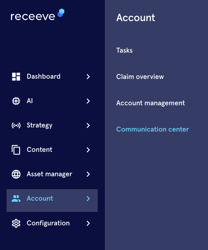
You will have access to the new communication center, displaying the inbound and outbound communications, for all channels.
You will also see critical information for each communication, such as:
- the communication channel (email, SMS, letter, call)
- the direction: outbound (sent by receeve) or inbound (sent by the debtor)
- the account reference
- Sent by: this would show the strategy step or the agent which has triggered the outbound communications, or the email of the debtor for the inbound communications
- Trigger: manual or automatic
- Delivery and read status, when the communication channel allows it
- Internal notes
- Date and time
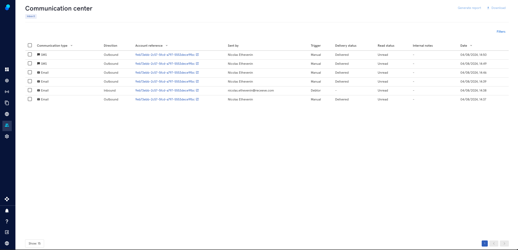
Filters are available in order to search for a specific account, channel, etc:

When clicking on a specific communication, you have access to more details and actions:
- Overview of the communication
- “View” in order to see the complete message, formatted (when applicable)
- The template used (when applicable)
- The link to the claim

The agent can take action, and triggered a new communication, either by using an existing template, or using the free text communication option. Please note that the “Reply” option is currently only working for the email channel.
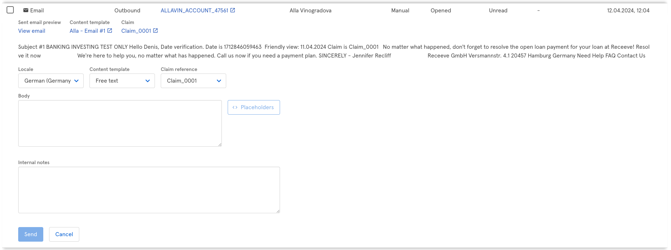
The agent can also “Dismiss” an inbound communication, effectively removing the link between the communication and the debtor account, and hiding it from the communication center; in case of unsolicited emails / spams.
last, the agent can also download communication reports and content from the dedicated button, upon selection of the check boxes on each row:
- the report is an extract of all data presented in the communication center
- the download is a consolidation of all actual communications, organized in a zip file, with directories organized by account IDs and claim IDs.
If you wish to allow the debtor to respond to the automatic emails from receeve’s platform, please get in touch with your professional services representative, in order to update the email address from “do-not-reply@xxx.com” to an standard email address.