Email Builder - Test Email
Send yourself a test email
You can send test emails in the receeve platform before you start sending them to your customers. Here's how:
- Go to Content>email Builder
- Once here, select the email you want to test.
- Click on the'Actions' dropdown.
- Select 'Send test email'
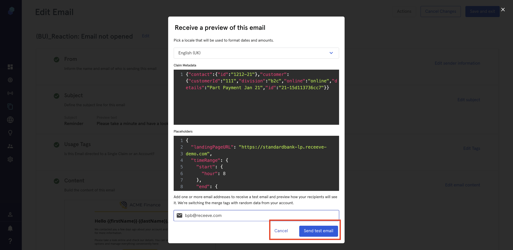
- A modal will open up. You'll be able to configure:
- Locale: Configure how dates and currencies are displayed
- JSON metadata: All the "standard" data is automatically filled in a random manner, such as name, amount, due date, etc. If you use some special metadata in the email, you might want to provide it so it appears in the test email.
- Email: You can add several email addresses to test the email.
Note: The test email is only active for emails created in the email builder.
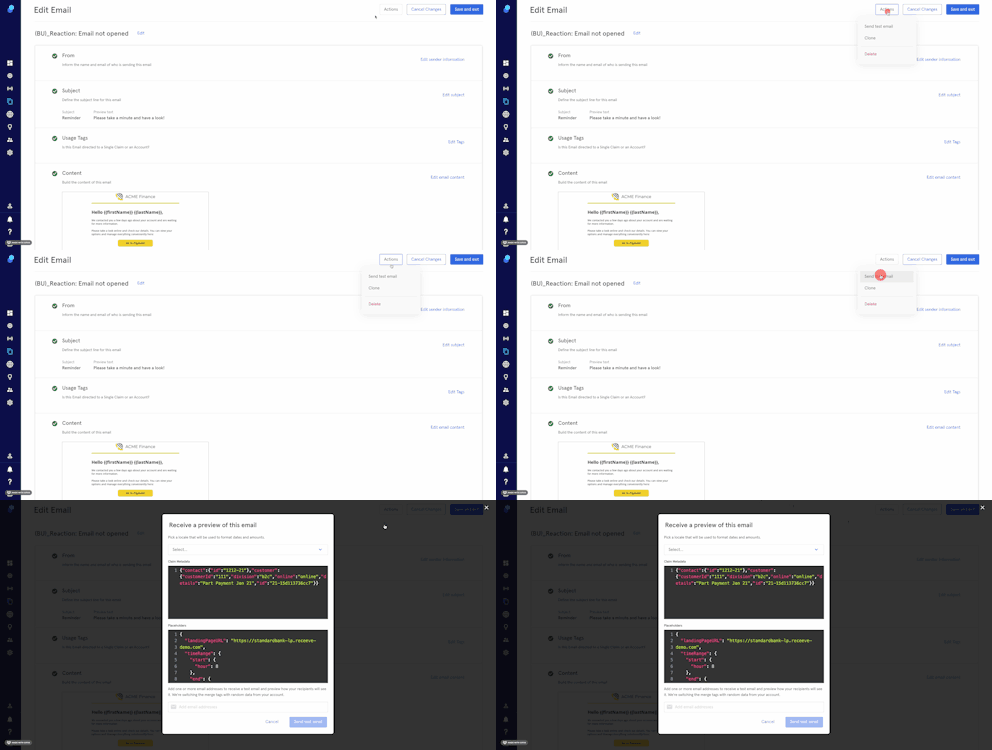
- Click on 'send test email' to test the email
- Click on 'Cancel' to exit the modal without sending a test email