AI Letter Editor
The AI Letter Editor is an AI-powered chat assistant built into the Letter Builder. Describe the letter you need and it fills in the whole template for you: the name, the categories and every content field of the layout you chose. Keep prompting to refine it, ask it how many pages the letter comes to, or ask it to explain the letter you have open. It works directly on the form in the builder, and the preview on the right re-renders as the changes land.
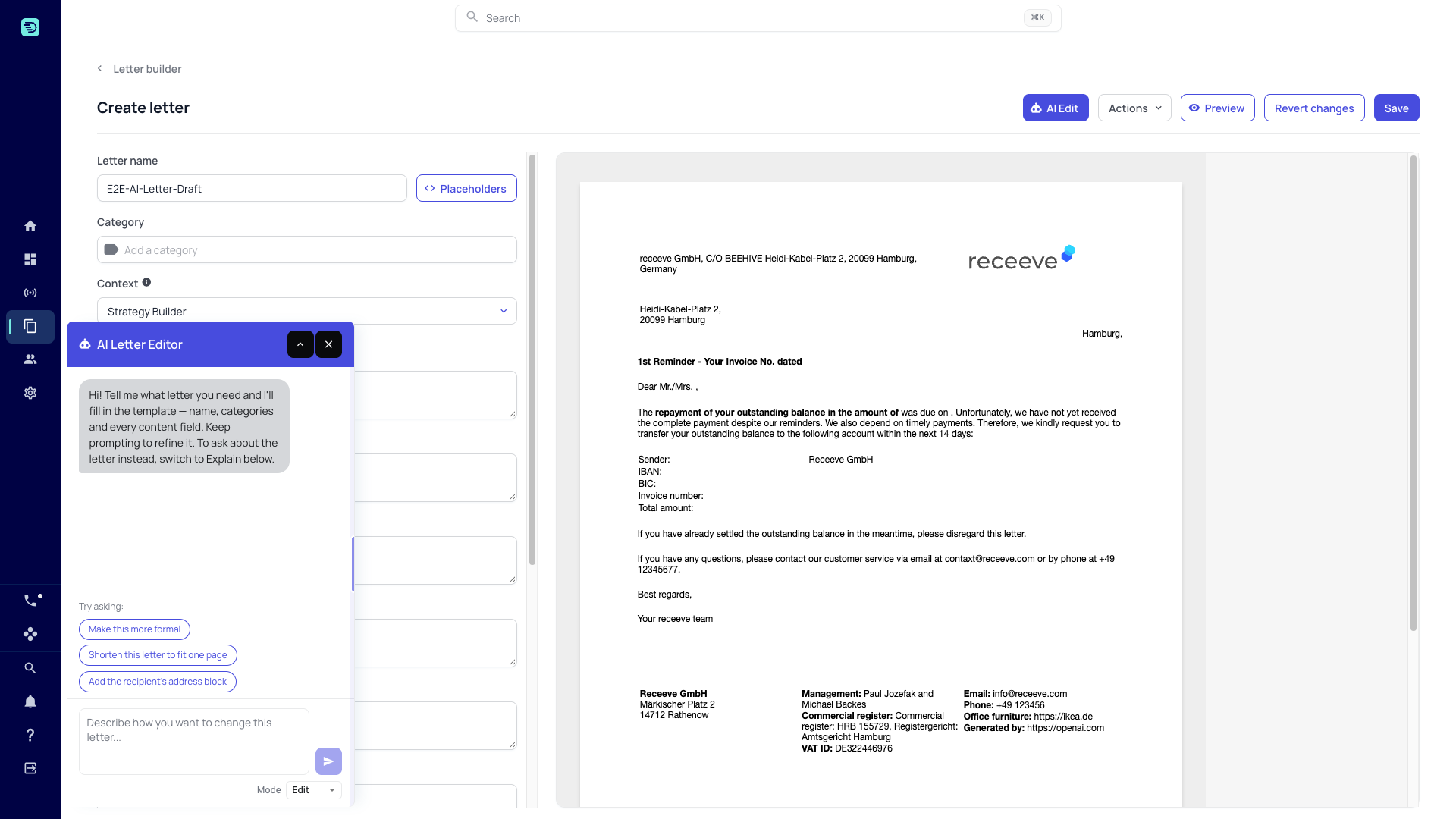
Opening the assistant
- On a new letter, the panel opens by itself as soon as you have named the letter and chosen its layout, in Edit mode, ready for your first prompt.
- On an existing letter, click the AI Edit button in the builder header.
The AI Letter Editor panel opens over the builder. The form and the preview stay fully visible and editable while the panel is open; use the minimise button (the chevron) in the panel header when it covers a field you want to reach, and the close button (×) beside it.
The two modes
Choose the mode from the Mode selector at the bottom of the panel:
| Mode | What it does |
|---|---|
| Edit | Fills in and changes your letter — one prompt proposes the whole template, further prompts refine it. |
| Explain | Answers questions about the letter you have open. It only reads the template. |
The assistant opens in Edit mode. Switching modes doesn't clear your conversation.
Getting started with suggested prompts
When the conversation is empty the panel shows suggested prompts under Try asking: — "Make this more formal", "Shorten this letter to fit one page" and "Add the recipient's address block", in Edit mode. Explain mode shows no suggested prompts. Click one, or type your own request into the box and click the send button.
A few things the assistant can do:
- "Write a formal final notice for an overdue invoice, with the outstanding amount as a placeholder"
- "Make the body more formal"
- "Shorten this letter so it fits on one page"
- "Which placeholders does this letter use?"
How it works on your letter
The assistant always works on the current state of the letter in the builder, including unsaved changes you made by hand. When it makes a change, the field updates immediately, the preview re-renders, and the assistant lists each change it applied under its reply.
The layout stays your choice: the assistant writes into the fields the layout you picked defines and never switches layouts.
AI edits behave exactly like manual edits — they are only persisted when you click Save. See Saving your changes.
Page count
On a saved letter the assistant can tell you how many printed pages a change produces and shorten the letter to a page target. See Page count.
Usage limits
The assistant shows your team's current AI usage above the input box (for example, "AI usage: 6% of your team's hourly limit · resets in ~35 min"). See Usage limits & availability.
In this section
- Edit your letter — fill in and refine a template with natural language
- Explain your letter — ask about the letter you have open
- Page count — how many pages the letter comes to
- Saving your changes — how AI edits are persisted
- Usage limits & availability
- Safety & good practices