Giving feedback
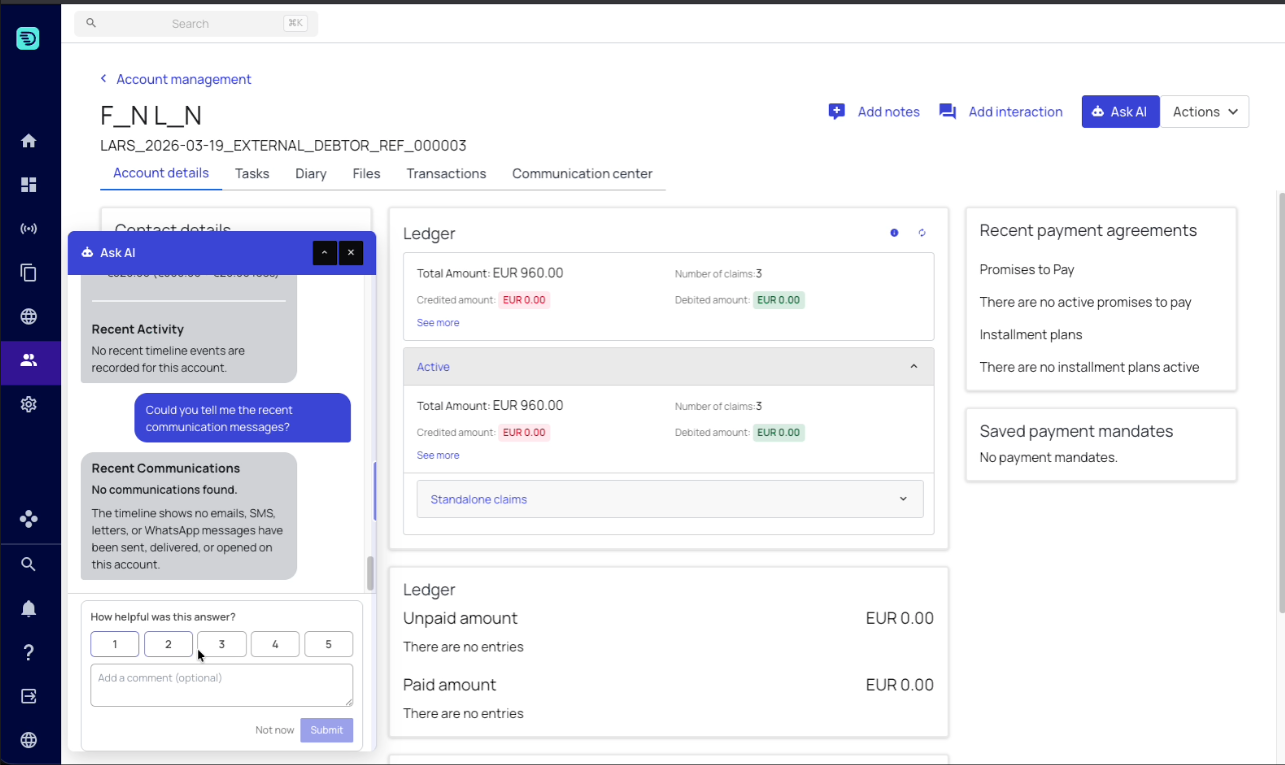
From time to time the assistant asks how helpful an answer was. It's a quick, optional rating that helps InDebted improve the assistant over time — the same prompt appears across all of InDebted's AI assistants, not just this one.
When it appears
The prompt shows up periodically — after several answers, not after every one — just below the assistant's reply and above the input box. You don't request it; the assistant surfaces it on its own at a steady interval as you keep asking questions.
It never interrupts an answer: it appears once a reply has finished, and you can carry on typing your next question whether or not you respond to it.
What it asks
- How helpful was this answer? — rate it from 1 (worst) to 5 (best).
- Add a comment (optional) — a free-text box if you want to say what was good or what was missing.
Pick a rating and choose Submit, or choose Not now to dismiss it. The rating applies to the specific answer the prompt appeared under.
What it does and doesn't do
- It's entirely optional — dismissing it with Not now has no effect on your conversation or your work, and the prompt will come round again later.
- It doesn't change anything on the account or claim. It's feedback about the assistant's answer, nothing more.
- Your rating and comment feed into improving the assistant's prompts and context, so a short note on a low score is genuinely useful.
If an answer was unhelpful, a one-line comment explaining what you actually needed is worth far more than the score on its own.