Investigating an account
Opened from an Account detail page, the assistant can reason across all of the account's claims rather than a single one. Everything on this page works in Explain mode, which is read-only.
Recent activity summary
- "Summarise the recent activity on this account."
- "What's happened on this account in the last month?"
- "When was the last communication sent to the debtor?"
The assistant reads the account-wide timeline and returns a dated, evidence-based summary of what has happened across the account's claims — communications sent, payments, promises to pay, contact-detail changes and strategy activity.
Contact-detail attribution
- "Who last updated the contact details, and when?"
- "Has this debtor's email address changed?"
- "When was this email address invalidated?"
The assistant reports the change with its date and before → after values, and names the acting user where one is recorded. It can also pinpoint contact-status changes, such as when an email address was marked invalid.
Overdue claims
- "Which claims on this account are overdue, and why?"
- "Which active claim has the oldest due date?"
- "What's the total outstanding on this account?"
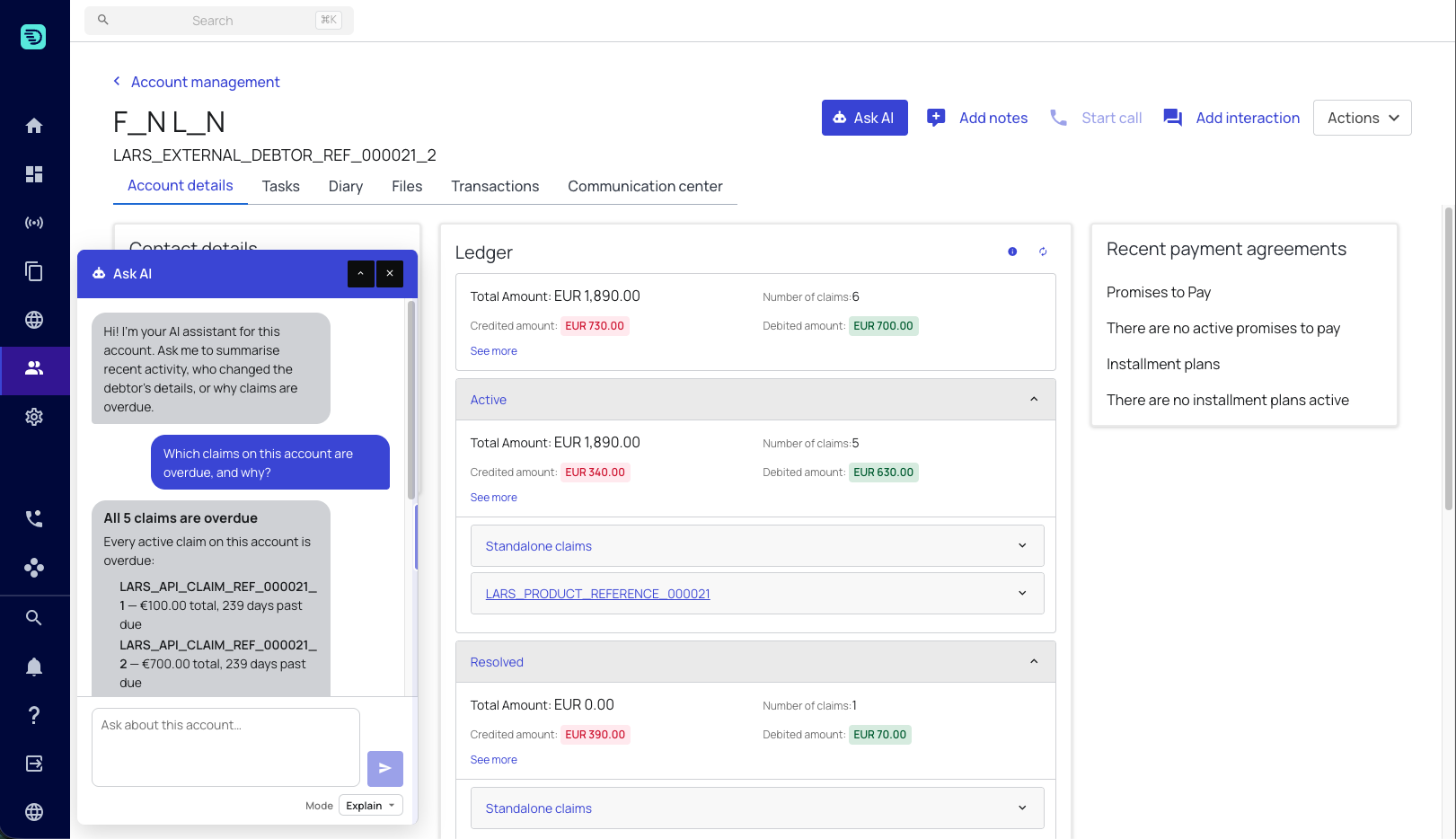
Which claims are overdue is answered precisely. Each claim carries a system-computed days-past-due figure and overdue flag derived from its due date, and the assistant reports those directly.
Why a claim is late is different in kind. There is no stored "overdue reason" field, so the assistant narrates the most likely driver from the timeline — a lapsed promise to pay, a failed payment, no payment method on file, unanswered communications. Treat that part as evidence-based interpretation rather than a recorded fact.
For totals, the assistant quotes the system's own computed figure per currency rather than adding the claims up itself. See Evidence & grounding.
Current state vs. history
The assistant draws a firm line between the two, and it's worth knowing which you're asking for:
| You want to know | Ask like this |
|---|---|
| What a value is right now | "What are this account's current metafields?" |
| How a value got there | "When did this account's metafield change, and who changed it?" |
Both are available on the account page — current metafields, the debtors' contact details, outstanding balances and currency on one side; the full change history on the other.
Working across claims
From the account page you can bring a specific claim into the conversation with an @mention:
- "Compare @ACC-1_invoice_1 and @ACC-1_invoice_2"
- "Why is @ACC-1_invoice_3 overdue?"
Start broad, then narrow. Ask for a recent-activity summary to get oriented, then drill into whichever claim the summary surfaces.